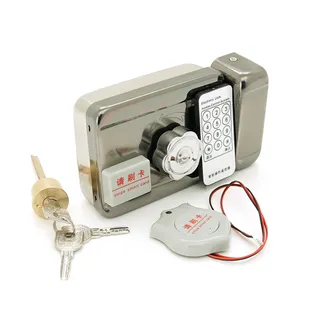
Cylinder Lock Core with Keys 35-50 mm
Voltronic
264 ₴
 1 / 2
SKU PF040+PBF05
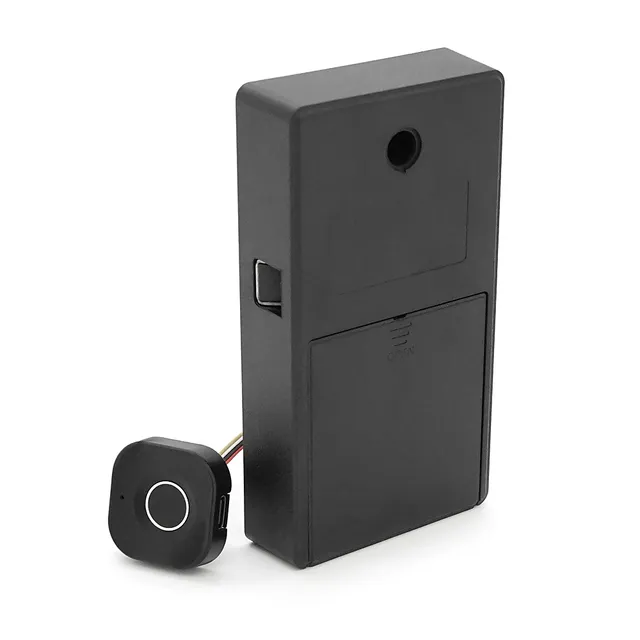
PiPo PF040+PBF05 electronic fingerprint lock for lockers and drawers, 3×AAA, 32×32×19.4 mm
Description:
Compact electronic furniture lock with biometric access control. The PF040 model with PBF05 body is ideal for securing drawers and lockers in offices, hotels, or residential environments. The lock unlocks via fingerprint and electronic key. Easily replaces conventional mechanical locks.
Specifications:
Parameter Value PiPo PF040+PBF05 electronic fingerprint lock for lockers and drawers, 3×AAA, 32×32×19.4 mm
Description:
Compact electronic furniture lock with biometric access control. The PF040 model with PBF05 body is ideal for securing drawers and lockers in offices, hotels, or residential environments. The lock unlocks via fingerprint and electronic key. Easily replaces conventional mechanical locks.
Specifications:
Parameter Value
Model PF040+PBF05
Lock type Electronic, biometric
Unlock method Fingerprint + E-key
Fingerprint memory Up to 20
Power supply 3 × AAA alkaline batteries
Battery life Up to 1 year
Panel material ABS plastic
Panel dimensions 32×32×19.4 mm
Installation In standard round cutout
Advantages:
• Compact and modern design
• Easy installation without furniture modification
• Suitable for office and home lockers and drawers
• Dual unlock system: fingerprint + electronic key
• Long battery operating life (up to 1 year)
Operation:
Activation via TTLOCK app required!
1. General Information
The lock is intended for installation on furniture: cabinets, drawers, nightstands, wardrobes, etc.
Supported unlocking methods:
• by fingerprint;
• via TTLOCK mobile application;
• using emergency external power.
Fingerprint registration and management are handled exclusively via the TTLOCK app.
2. Getting Started
1. Install the batteries (see "Power Supply" section).
2. Install the TTLOCK app from the App Store or Google Play.
3. Register an account in the app.
4. Turn on Bluetooth on your smartphone.
3. Unlocking by Fingerprint
• Factory state: no fingerprints registered, lock will not open.
• After fingerprint registration:
1. Place registered finger on the sensor.
2. Lock unlocks automatically.
3. After 4 seconds, the lock re-locks automatically.
• If fingerprint is invalid — red indicator lights up for 2 seconds.
4. Pairing Lock to TTLOCK
1. Enable Bluetooth and location services on your smartphone.
2. Open the TTLOCK app.
3. Tap "+" (Add Lock).
4. Follow on-screen instructions:
• search for the lock;
• add the lock;
• rename lock if necessary.
5. After successful pairing, the lock will appear on the home screen.
5. Adding a New Fingerprint
1. Open the lock in the TTLOCK app.
2. Navigate to Fingerprints section.
3. Tap Add Fingerprint.
4. Place finger on sensor multiple times following prompts.
5. Upon completion, the fingerprint will appear in the list.
6. Deleting a Fingerprint
1. Open the lock in the app.
2. Navigate to Fingerprints section.
3. Select desired fingerprint.
4. Tap Delete and confirm removal.
7. Unlocking via App
1. Open the TTLOCK app.
2. Select desired lock.
3. Tap lock icon.
4. Lock unlocks and re-locks automatically after 4 seconds.
8. Viewing Access Logs
1. In the lock menu, select Records.
2. View unlock history:
• time;
• unlocking method.
9. Factory Reset
(Deleting lock from app)
1. In the app, open Settings.
2. Tap Delete. App (account) password required.
3. Confirm action.
4. All fingerprints will be cleared, lock reverts to factory defaults.
10. Power Supply and Low Battery Indication
Main Power
• 4 × AAA alkaline batteries
• Do not use zinc-carbon batteries.
Low Battery Indications
• Red indicator flashes for approx. 3 seconds upon opening.
• Batteries must be replaced.
Emergency Power
• In case of complete battery depletion:
• connect a power bank or charging cable to the USB port;
• unlock the lock;
• replace batteries.
11. Operating Conditions
• Indoor use only.
• Avoid moisture and condensation.
• Prevent mechanical impact to sensor.
• Clean sensor with a soft dry cloth.
Model PF040+PBF05
Lock type Electronic, biometric
Unlock method Fingerprint + E-key
Fingerprint memory Up to 20
Power supply 3 × AAA alkaline batteries
Battery life Up to 1 year
Panel material ABS plastic
Panel dimensions 32×32×19.4 mm
Installation In standard round cutout
Advantages:
• Compact and modern design
• Easy installation without furniture modification
• Suitable for office and home lockers and drawers
• Dual unlock system: fingerprint + electronic key
• Long battery operating life (up to 1 year)
Operation:
Activation via TTLOCK app required!
1. General Information
The lock is intended for installation on furniture: cabinets, drawers, nightstands, wardrobes, etc.
Supported unlocking methods:
• by fingerprint;
• via TTLOCK mobile application;
• using emergency external power.
Fingerprint registration and management are handled exclusively via the TTLOCK app.
2. Getting Started
1. Install the batteries (see "Power Supply" section).
2. Install the TTLOCK app from the App Store or Google Play.
3. Register an account in the app.
4. Turn on Bluetooth on your smartphone.
3. Unlocking by Fingerprint
• Factory state: no fingerprints registered, lock will not open.
• After fingerprint registration:
1. Place registered finger on the sensor.
2. Lock unlocks automatically.
3. After 4 seconds, the lock re-locks automatically.
• If fingerprint is invalid — red indicator lights up for 2 seconds.
4. Pairing Lock to TTLOCK
1. Enable Bluetooth and location services on your smartphone.
2. Open the TTLOCK app.
3. Tap "+" (Add Lock).
4. Follow on-screen instructions:
• search for the lock;
• add the lock;
• rename lock if necessary.
5. After successful pairing, the lock will appear on the home screen.
5. Adding a New Fingerprint
1. Open the lock in the TTLOCK app.
2. Navigate to Fingerprints section.
3. Tap Add Fingerprint.
4. Place finger on sensor multiple times following prompts.
5. Upon completion, the fingerprint will appear in the list.
6. Deleting a Fingerprint
1. Open the lock in the app.
2. Navigate to Fingerprints section.
3. Select desired fingerprint.
4. Tap Delete and confirm removal.
7. Unlocking via App
1. Open the TTLOCK app.
2. Select desired lock.
3. Tap lock icon.
4. Lock unlocks and re-locks automatically after 4 seconds.
8. Viewing Access Logs
1. In the lock menu, select Records.
2. View unlock history:
• time;
• unlocking method.
9. Factory Reset
(Deleting lock from app)
1. In the app, open Settings.
2. Tap Delete. App (account) password required.
3. Confirm action.
4. All fingerprints will be cleared, lock reverts to factory defaults.
10. Power Supply and Low Battery Indication
Main Power
• 4 × AAA alkaline batteries
• Do not use zinc-carbon batteries.
Low Battery Indications
• Red indicator flashes for approx. 3 seconds upon opening.
• Batteries must be replaced.
Emergency Power
• In case of complete battery depletion:
• connect a power bank or charging cable to the USB port;
• unlock the lock;
• replace batteries.
11. Operating Conditions
• Indoor use only.
• Avoid moisture and condensation.
• Prevent mechanical impact to sensor.
• Clean sensor with a soft dry cloth.
Dispatch to post branches, parcel lockers, or by courier to your doorstep. All packages are insured for 100% of value. Delivery time: 1–3 business days.
Flexible options: Cash on delivery at Nova Poshta branch or bank transfer invoice (IBAN) for individuals, FOP and companies.